A preview feature is now available so that you can see how your Project presentation and all related content will look like when published.
Preview before publishing
Sometimes you just want to take your time to complete your Project, fine-tune your map, add story posts with nice pictures, in short, create a compelling presentation. The Project Preview feature will help you visualize and understand the looks of your presentation, and especially of the project map, before publishing it. The preview is available for all Project members and delivers the exact same look and feel as the published presentation.
How it works
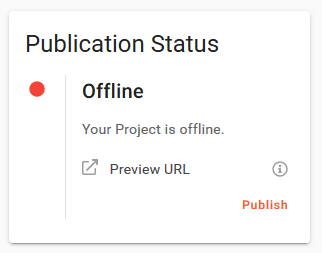
When your Project is unpublished (draft), a link to its preview visualization will appear in the “Publication Status” widget at the right upper corner of the Project overview page in the user dashboard.
In the preview mode, the Project presentation looks exactly as it would look like when published. A reminder at the top bar of the view shows you that you are in the preview mode.

Available for all users
The Project Preview feature will be available for all plans, including the free plan.
Not yet a user? Get a free account!